
A workbench for
serious AI coding.
Codekin is a self-hosted platform for Claude Code, Codex, and OpenCode that adds persistent sessions, parallel workspaces, structured approvals, and workflow orchestration — so your team can run AI coding at scale.
curl -fsSL codekin.ai/install.sh | bash Install once, then open it from any browser — on that computer, or from any device through app.codekin.ai or your own Codekin web app. You can also view on GitHub.
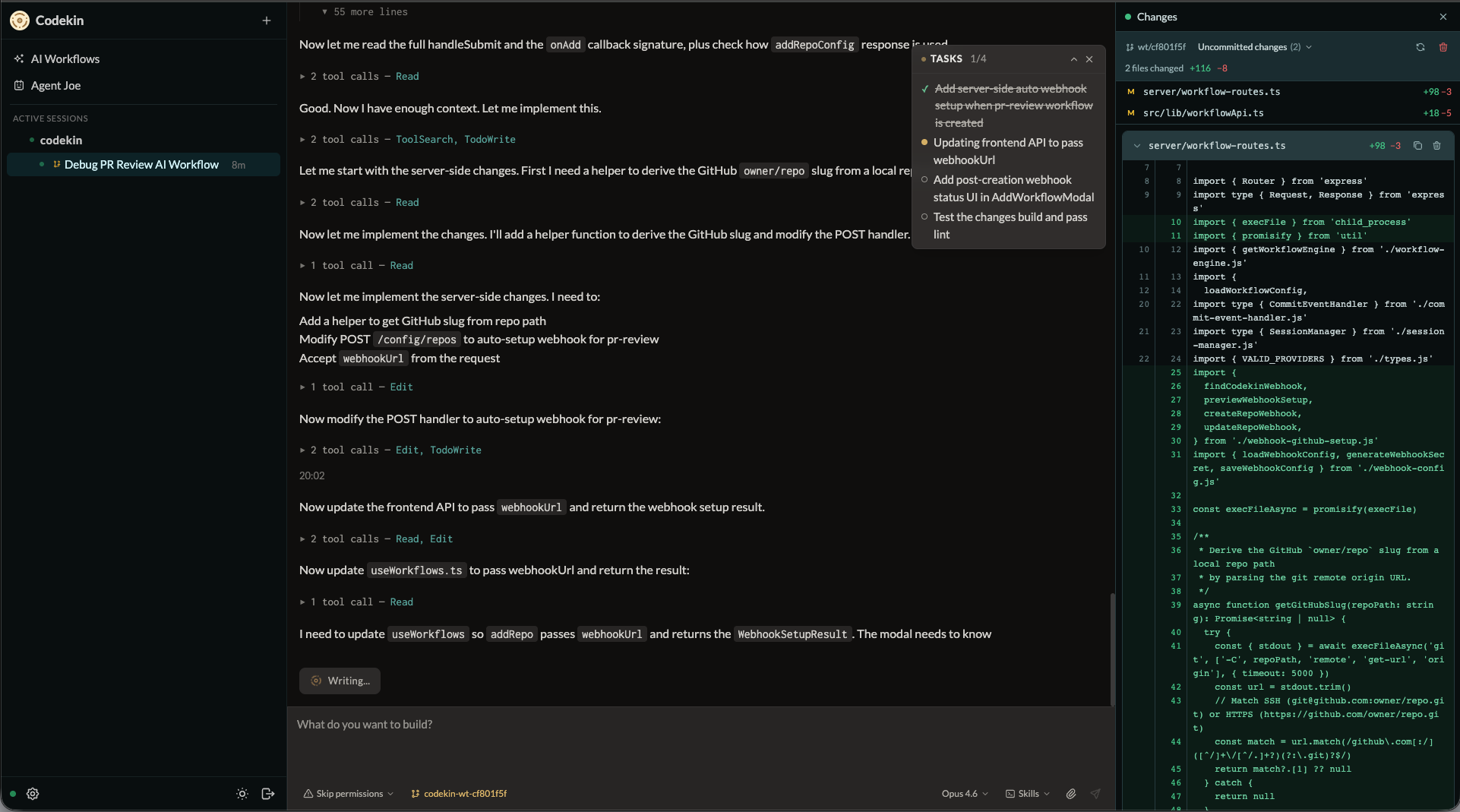
Everything you need to run AI coding in production
Interactive where you work. Structured where it matters. Automated where it repeats.
Interactive workbench
Use it from any device
Open Codekin from desktop or mobile — on the computer itself, or anywhere through app.codekin.ai or a web app you host. Your computer connects out, so there are no SSH hops and no open ports.
Persistent sessions
Refresh, disconnect, or restart without losing work. Sessions survive across reconnects.
Session history
All session transcripts are stored locally. Search, replay, and reference past work without relying on a third party.
Diff view
See exactly what changed in each session with an inline diff viewer. Review agent edits before approving.
Built-in file browser
Inspect project files and Markdown directly in the session view without switching tools.
Structured approvals
Review and manage approvals in a clear UI. Audit and revoke with full history.
Orchestration & automation
Parallel workspaces
Run multiple sessions across repos simultaneously, each with its own isolated context.
Git worktree support
Each session runs in its own worktree, so agents work on isolated branches without stepping on each other.
Orchestrator agent
A coordinator agent that plans and delegates work across repos, breaking large tasks into parallel sessions — and diagnoses incidents flagged by built-in deployment and host monitoring.
Outcome loops
Run an agent until your own build, test, and lint commands pass, within turn, cost, and time budgets. A second agent reviews the diff, and a passing run opens the pull request itself.
Scheduled workflows
Run recurring checks and repo tasks on a schedule using workflow definition files, with every run — and why it did or didn't fire — in one Automations view.
GitHub CI integration
Route CI failures from GitHub into Codekin sessions with context already attached, and review pull requests automatically.
Open platform
Claude Code, Codex & OpenCode
Works with Claude Code, Codex, and OpenCode. Pick the right agent per session from one interface.
Hand off between agents
Switch a running session to another agent and carry its context across, instead of starting over.
Open source
Full source available. Fork it, extend it, and wire in your own skills and automation.
Self-hosted
Run on your infrastructure with full control over data, networking, and configuration — including your own web app for remote access, on your domain and sign-in.
Teams & workspaces
Invite people into a workspace by link, give each a role, and share individual sessions with exactly the permissions they need.
Security built in
Two-factor authentication with authenticator apps and passkeys, re-verification for sensitive actions, and an audit log of who did what.
Why teams choose Codekin
Works with Claude Code, Codex, and OpenCode. More durable than the CLI alone, more controllable than SaaS platforms.
Multi-agent support
Run Claude Code, Codex, and OpenCode side by side with a consistent interface for sessions, approvals, and workflows.
Self-hosted control
Keep data and runtime on your infrastructure — even the web app you reach it through. Fits into your existing auth, networking, and deployment stack.
Built-in orchestration
Combine live sessions with scheduled workflows, webhooks, and CI-driven runs in one platform.
Built for real engineering workflows
Daily AI coding workbench
Keep long-running sessions alive across repos and resume instantly after interruptions.
Parallel work across repos
Run multiple sessions on different repos simultaneously, each with isolated context.
CI failure triage
Route failed GitHub CI runs into Codekin sessions with context attached — or hand them to a repair loop that fixes, verifies, and opens the pull request.
Automated PR review
Use scheduled workflows and GitHub triggers to handle repeatable review tasks automatically.
Shared team context
Capture repo guidance, reusable skills, and approval history so each session starts with context.
Webhook-driven runs
Connect webhooks, CI pipelines, and internal automation to trigger AI coding sessions.
Get started in minutes
Prerequisites
- macOS or Linux
- Claude Code, Codex, or OpenCode CLI installed and authenticated
- Node.js 20+ (the installer sets it up if needed)
Install
curl -fsSL codekin.ai/install.sh | bash The installer will:
- Install Node.js 20+ if needed (via nvm)
- Check for a supported coding agent CLI, and stop with instructions if none is found
- Install the
codekinnpm package globally - Generate a local access token
- Install and start a persistent background service
- Print your access URL
Open the printed URL on that computer and start working — the access token is part of the link. Run codekin token to print it again.
Use it from another device
Open app.codekin.ai — or host your own Codekin web app for your team — and sign in with GitHub. Access is by invitation from a workspace owner or admin.
Choose Connect your computer and run the generated command on that computer. It installs Codekin and pairs it in one step; the computer connects outbound only, so no ports are opened.
Usage
codekin token                   # Print access URL with auth token
codekin config                  # Update settings
codekin service status          # Show service status
codekin service install         # Install + start background service
codekin service uninstall       # Remove background service
codekin start                   # Run server in foreground
codekin stop                    # Stop the background service
codekin setup --regenerate      # Regenerate auth token
codekin relay status            # Show web app pairing + connection
codekin relay login             # Pair this computer with a web app
codekin upgrade                 # Upgrade to the latest version
codekin uninstall               # Remove Codekin entirely